00:00 IST

BU Dashboard

Smart, customizable dashboard for managing classroom insights, assignments, and learning progress

BU Dashboard

OVERVIEW

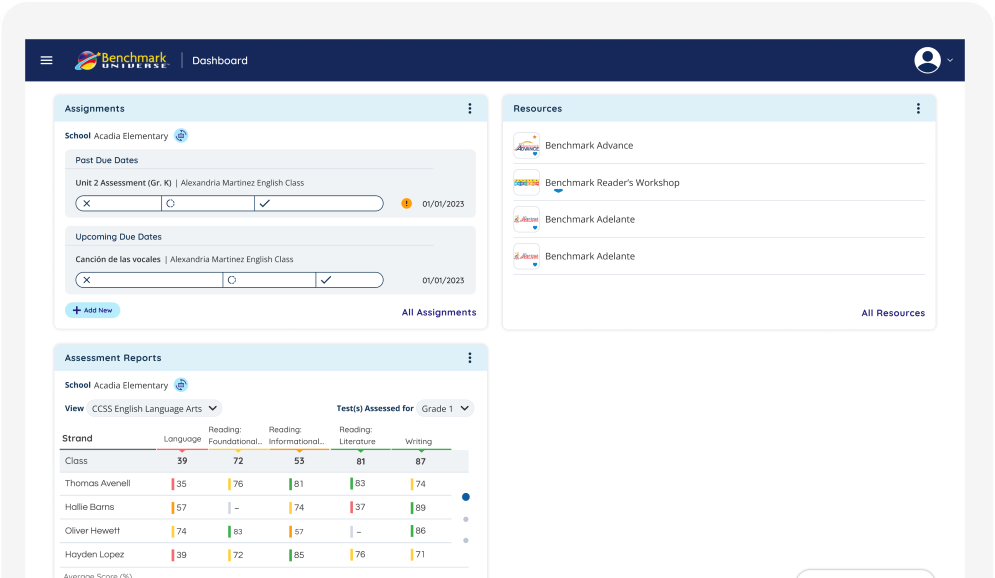
Improving Classroom Decision-Making Through a Customizable Data Experience. This project redesigns the main dashboard for Benchmark Education — a digital platform used by K–5 teachers to manage literacy instruction, assessments, and classroom resources. The goal was to transform the dashboard from a static information page into a flexible, insight-driven workspace where teachers can quickly understand student progress and manage daily classroom tasks.

INDUSTRY

EdTech

ROLE AND DURATION

UI Design

2024

CLIENT

BU Logo_

The Problems

Teachers interact with multiple tools daily — assignments, assessments, reports, and resources. However, the existing dashboard presented information in a fixed layout with limited prioritization, forcing teachers to:

  • Navigate multiple sections to find important information
  • Scan dense reports before identifying struggling students
  • Adapt their workflow around the system rather than the system adapting to them

From a UX perspective, the dashboard lacked:

  • Personalization
  • Information hierarchy
  • Task-focused workflows

This created friction during critical moments such as lesson preparation or student intervention planning.

The Opportunity

Teachers manage classrooms differently depending on:

  • grade level
  • curriculum focus
  • student needs
  • district requirements

A single static dashboard could not support all workflows.
The opportunity was to design a modular dashboard system where teachers could:

  • prioritize the tools they use most
  • rearrange information based on their workflow
  • access insights faster

My Role

Responsibilities included:

  • Product discovery
  • UX strategy
  • Information architecture
  • Dashboard interaction design
  • Widget system design
  • High-fidelity UI
  • Developer collaboration during implementation

Understanding the Users

Teachers manage classrooms differently depending on:

  • grade level
  • curriculum focus
  • student needs
  • district requirements

A single static dashboard could not support all workflows.
The opportunity was to design a modular dashboard system where teachers could:

  • prioritize the tools they use most
  • rearrange information based on their workflow
  • access insights faster
Scroll to Top